
Global Election Simulator – Play Online & Map Guide
Play Global Election Simulator online. Change candidate support, run an election count and explore how votes become seats across country maps.



















Country Maps, Vote Shares and Electoral Rules
- Category
- Simulator Games
- Platform
- Web browser
- Mode
- Election simulation sandbox
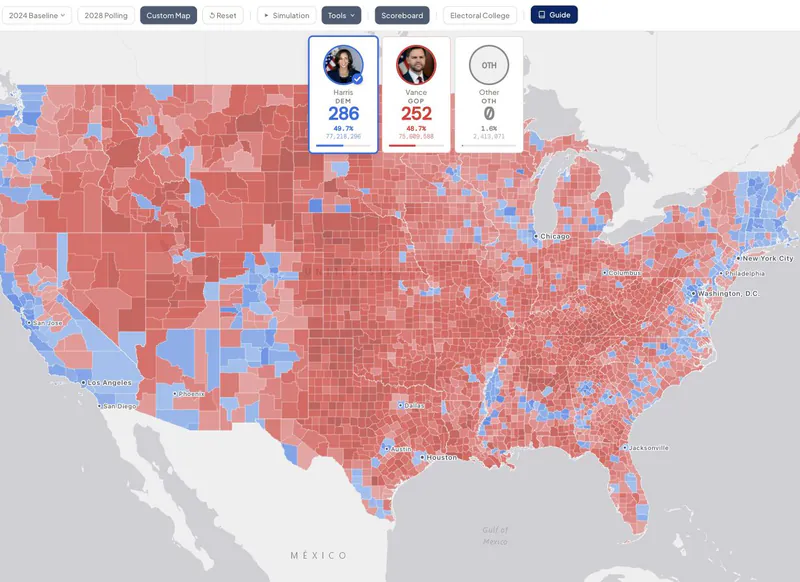
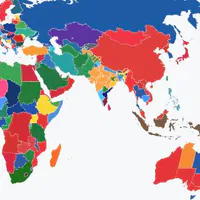
Global Election Simulator is an interactive election sandbox. Its directory connects country maps with presidential and parliamentary contests, historical scenarios and entries explicitly marked imaginary. Choosing a different country gives you a different voting system to investigate, rather than simply swapping a flag on one universal rule set. The USA presidential simulator gives a concrete example of why the map matters. Its Guide explains an Electoral College of 538 votes and a majority threshold of 270. National popular-vote support and an electoral result measure different things; looking at states and counties alongside the scoreboard helps you understand where a scenario’s result comes from. Use the live count as a way to follow the sequence of results. Vote shares, reporting progress and electoral totals change as the simulation unfolds. If you only need to compare two sets of inputs, a short count is convenient. If you want the atmosphere of election night, select a longer duration and follow the changing map. The 2024 Baseline, 2028 Polling and Custom Map are distinct starting views in the USA experience. The in-game Guide describes the 2028 model as a scenario rather than a forecast. Your edited results are experiments within the simulator, so keep the chosen assumptions in mind when comparing them. Maps and screenshots: GlobalElectionSimulator.com. Explore the country directory to continue with another electoral system after your first count.
How to Play Global Election Simulator
Controls
Start by choosing a country and the contest you want to explore. A presidential election, a parliamentary election and an imaginary scenario can use different rules, even when their maps look similar. Read the simulator’s guide before changing values so you know whether the result is expressed as seats, electoral votes or a single winner. For a first USA session, choose Custom Map, then open Simulation. Set the national vote shares for Democratic, Republican and Other, choose a count duration, and press RUN SIMULATION. A zero-minute count is useful for a quick experiment; longer options let you watch an election-night sequence. Count music can be switched off while you focus on the numbers. Watch the scoreboard together with the map. Hover over a state to inspect its figures, and use Tools to explore county detail. Change one input at a time and rerun the scenario: this makes it easier to connect your adjustment with the places that change color and the electoral totals that move. A nationwide share alone does not explain every region. Once you understand the basic loop, compare a custom scenario with the 2024 Baseline or explore the 2028 Polling view. Those views retain separate contents. Reset applies to the map you are currently viewing, so check the selected tab before clearing a scenario you wanted to keep. Tools also provides Sandbox options for experimenting with candidates.
Game Features
- Country directory with presidential and parliamentary contests
- Historical and explicitly imaginary scenarios
- Editable candidate support and national vote shares
- USA state and county detail with a live scoreboard
- Selectable election-night count duration and music
- Separate USA baseline, polling and custom map views
Global Election Simulator Gameplay Videos & Walkthrough Guides
Election Simulator FAQ
Is the 2028 Polling view a prediction?
The USA Guide describes it as a model rather than a forecast. Treat it as a starting scenario and examine the assumptions before comparing results.
Why can the popular vote and electoral result differ?
The USA presidential contest allocates electoral votes through states. The Guide gives a total of 538 and a majority of 270; the national vote share is a separate measure.
How do I compare scenarios quickly?
Choose the zero-minute count in Simulation, run one set of shares, then change a single value and run again. The short duration keeps the comparison focused.
Will Reset clear every map tab?
Reset affects the current USA view. Baseline, Polling and Custom Map remember their own contents, so select the view you intend to clear first.
Can I simulate elections outside the USA?
Yes. The directory offers other countries and electoral contests, including parliamentary systems. Open the relevant country card and read that simulator’s voting rules before experimenting.