
Pokemon Emerald Arena – Real-Time Battles & Setup Guide
Pokemon Emerald Arena turns GBA battles into real-time fights. Learn movement, dodging, catching and setup with your own Emerald ROM and a GBA emulator.
Visit the developer for the current patch, preparation tool and gameplay instructions.
Get Emerald Arena & Setup InstructionsRequires your own unmodified Pokémon Emerald USA/Europe .gba ROM and a GBA emulator. Prepare the game on a computer; the finished ROM works offline.














About the Real-Time Emerald ROM Hack
- Category
- Arcade Games
- Platform
- GBA ROM hack · GBA emulator required
- Mode
- Real-time wild and single trainer battles
- Developer
- Germán Burgardt
- Status
- Version 0.11.0 · In development
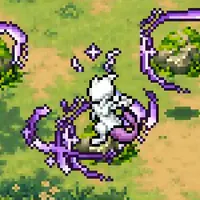
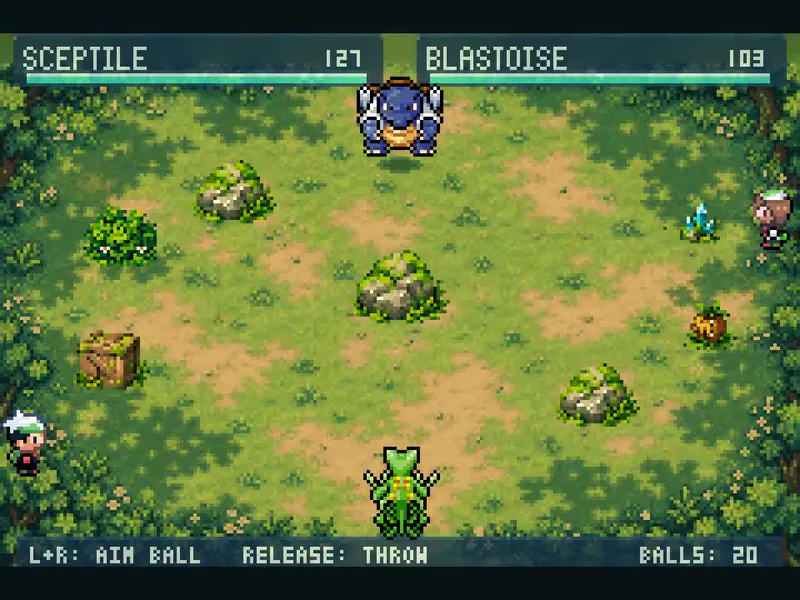
Pokémon Emerald Arena is an unofficial fan project by Germán Burgardt that changes supported encounters into real-time arena fights while retaining the GBA game underneath. It is a ROM hack for your own copy of Emerald, with an emulator as the runtime. The current documented release is 0.11.0 and remains in development. The arena makes movement and terrain part of a battle. Rocks, wood, foliage, crystals and explosive pods can break. Water leaves pools that ice can freeze and fire can melt. Dig hides a Pokémon underground, Fly leaves a moving shadow before its dive, Teleport changes position and Double Team creates a decoy that breaks when hit. These interactions create decisions about range, cover and the timing of an attack. Some Pokémon and moves add different tactical options. Ghost types pass through objects and can leave one edge of an arena to return at the opposite edge, although attacks still collide with cover. Smokescreen temporarily prevents enemy tracking. Substitute trades a quarter of maximum HP for a movable shield, making health part of the decision to create protection. The documented roster includes 151 animated Pokémon, with early-route encounter families through Slateport and Route 110, plus Route 116 and nearby caves and waters. That animation count does not mean every encounter or effect is compatible with arena combat. Wild and single trainer fights are the current focus; double and link battles, unsupported abilities, held items, most status conditions and incompatible move sets can retain classic turn-based combat. Not all Hoenn is covered, and the adventure is not fully rebalanced. For desktop play, the developer tests with mGBA. A prepared .gba can also be transferred to a phone or handheld that already has a suitable emulator. Prepare it on a computer rather than inside a phone’s file preview; physical GBA hardware has not been verified.
How to Play Pokemon Emerald Arena: Prepare, Practice and Battle
Controls
First prepare the game with your own unmodified Pokémon Emerald USA/Europe .gba file. Download and extract the current release ZIP from the developer, open Prepare-Emerald-Arena.html in a desktop browser, choose the original ROM and wait for preparation to finish. Download the resulting .gba and load it in a GBA emulator. Setup needs Internet access for animation files; your original ROM is read locally and is not uploaded or overwritten. The finished game runs offline. For a quick first session, keep existing saves backed up and separate, then start with no save attached to the new game. Highlight NEW GAME and press the emulator button mapped to SELECT. Pressing A starts the normal introduction instead. The practice start gives you Charizard and five teammates; begin a field practice encounter, move into range, aim a move and dodge the reply. Pause to inspect PP or choose a different attack before continuing. These controls are GBA button labels, not literal keyboard keys. Check the emulator’s input settings and bind L and R to separate keys you can hold together. Practice encounters spend actual HP and PP, so visit a Pokémon Center between fights. Reorder your party to try another lead; six additional Pokémon are available in Box 1. An existing regular save keeps its encounters and does not automatically receive the practice team. Position matters during combat. Opponents navigate around obstacles, aim and dodge; their decisions consider distance, types and remaining PP. Watch the attack recovery indicator below the HUD before committing to another strike. Move selection and timing work alongside familiar battle resources instead of replacing HP, PP and experience. To catch a wild Pokémon, weaken it before aiming a Poké Ball. Combat slows during aiming and the throw, but a miss still consumes a ball and a breakout resumes the fight. Catches join your team or go to the PC when the party is full. Buy regular Poké Balls through the normal game; only the fresh practice start supplies 20, while existing saves receive no free items. Save through the game’s field menu. Before updating, back up the in-game .sav and import a copy into the new version, or match its basename to the new ROM if your emulator requires that. Emulator save states should not be carried across versions.
Game Features
- Real-time movement, aiming and directional dodges in supported encounters
- Four selectable moves with a pause menu for PP, bag and party decisions
- Breakable arena objects and water, ice and fire terrain interactions
- Fresh practice start with Charizard, teammates and field-triggered opponents
- Aim and throw Poké Balls during wild battles
- 151 animated Pokémon, with compatibility depending on encounter and effects
- Original HP, PP and in-game saves remain part of progression
- Offline emulator play after preparing the game with your own Emerald ROM
Emerald Arena Gameplay Videos & Walkthrough Guides
See movement and attacks in an earlier 0.7 preview. The current release’s setup and compatibility are described above.
Emerald Arena Setup & Battle FAQ
Can I play directly in a web browser?
The browser is used to prepare your own original USA/Europe Emerald ROM, not to run an instant game. Play the finished .gba in a GBA emulator; you can transfer that prepared file to a phone or handheld emulator.
How do I reach the practice battles quickly?
Use a separate fresh save, highlight NEW GAME and press SELECT instead of A. This starts the Charizard practice party. L and R together in the field summon a practice opponent; heal between fights because HP and PP are consumed.
What happens if a Poké Ball misses?
A miss still consumes one regular Poké Ball. If the Pokémon breaks out, battle resumes. A successful catch goes to the party or PC, and the arena does not award capture XP.
Why do the listed buttons not match my keyboard?
A, B, L, R, START and SELECT are GBA button names. Check which keys your emulator maps to them, make L and R independently usable together, and check that combat is not paused if movement stops.
How should I keep my save when updating?
Back up the in-game .sav before changing versions. Import a copy for the new ROM or use matching ROM/save basenames as your emulator requires. Avoid loading an older emulator save state into a newer release.
Why does an encounter still use turn-based combat?
Classic combat is the fallback for unsupported encounters or effects. Double and link battles stay classic, and unsupported abilities, held items, most statuses or a move set without an adapted damaging move can prevent arena combat. Animated sprites alone do not guarantee compatibility.