

coer id cortis brasil - Create Your CORTIS Member Card
coer id cortis brasil is a browser card-creation game where you choose a CORTIS member, personalize an ID, and make a downloadable keepsake.


















About the CORTIS Brasil Member-Card Creator
- Category
- Simulator Games
- Platform
- Web browser
- Mode
- Interactive member-card creator
- Developer
- CORTIS Brasil
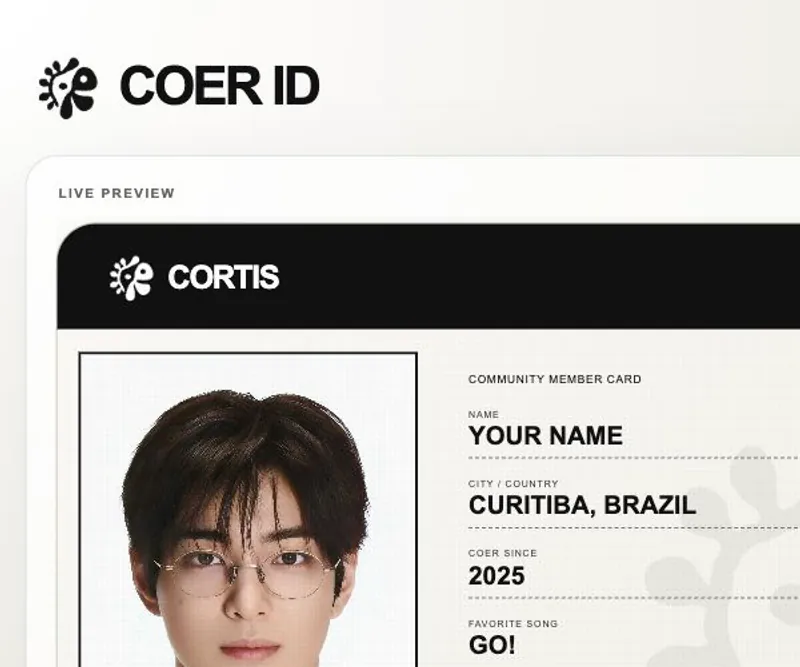
This browser experience turns CORTIS Brasil styling into a short creative activity. Select one of five member cards, add a few personal details, and watch the preview become your own COER ID design. The result is made for quick sharing or keeping: the builder presents a finished card view and gives you a Download My COER ID action when your choices are ready.
How to Play coer id cortis brasil: Build Your Card
Controls
Start by choosing the member whose card you want to create. Add your name and city or country, then choose a COER since year and favorite song from the available menus. The live preview updates as you personalize the card, so check the member image, ID number, location, year, song, and signature before using Download My COER ID. Choose Make Another whenever you want to begin a fresh design.
Game Features
- Five selectable CORTIS member cards
- Name and city or country personalization
- COER since year choices for 2025 or 2026
- Favorite-song menu with multiple options
- Live card preview with member styling
- Download and restart actions
CORTIS Brasil Card-Creator Questions
What is this CORTIS Brasil card creator?
It is a browser-based COER ID activity where you select a CORTIS member, add personal details, and build a personalized member card with a live preview.
Which member cards can I choose?
The builder presents five choices: MARTIN, JAMES, JUHOON, SEONGHYEON, and KEONHO. Select a card to set the member identity and portrait used by the preview.
How do I finish a personalized card?
Fill in the name and city or country, choose the COER since year and favorite song, review the live preview, then use Download My COER ID.
Can I make another card after finishing one?
Yes. Choose Make Another to return to a fresh card-creation flow and try a different member or a new combination of personal details.