

Engine Simulator 3D – Build & Rev Engines Online
Play Engine Simulator 3D online: start a preset, adjust throttle and engine specs, and explore 3D mechanics with live RPM, horsepower and data tools.




















About Real Engine Simulator
- Category
- Simulator Games
- Platform
- Web browser
- Mode
- Engine simulation sandbox
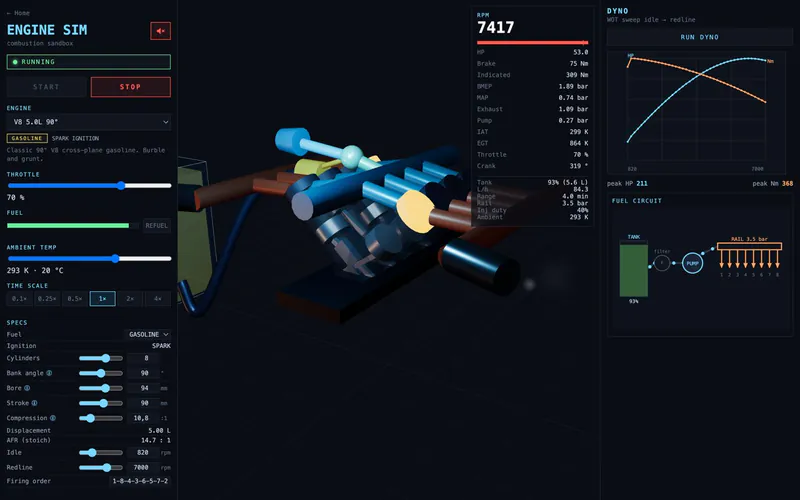
Engine Simulator 3D opens Real Engine Simulator, a browser sandbox for exploring engine layouts, sound and operating behavior. Its preset selector covers piston engines, radial aero engines, Wankel rotaries and turbojets. That range makes it possible to look beyond a familiar inline or V layout and compare very different ways of producing power. The simulator combines a 3D mechanical view with live readings. The RPM and horsepower gauges give a quick response to operation, while the dyno and pressure-volume trace provide another way to examine what a configuration is doing. Synthesized engine sound adds an audible comparison; the sound toggle lets you enable it when you want to listen as well as watch. This is a useful companion for players interested in the mechanical side of racing and motorcycle games. A productive session begins with a stable preset, changes one input, and compares the result. Preset operation and basic settings can be tried without a download. Advanced tuning is offered through a free account, while the separate Build your own tool uses subscription access.
How to Play Engine Simulator 3D
Controls
Begin with a familiar piston preset such as Inline-4 2.0L. Selecting the card opens the 3D engine and the driving controls. Press START, wait for the RUNNING status and watch the RPM gauge at idle. Move THROTTLE gradually and compare the live RPM and horsepower readings. This gives you a baseline before changing the engine itself. The driving panel adds a second experiment: gear selection and vehicle class. Notice whether the transmission is in neutral, use the shift controls when you want another gear, and inspect the AUTO setting. The class menu displays different vehicle masses, from a bike to larger vehicles. Keep engine settings fixed when comparing classes so the change in the simulated vehicle is easier to follow. Open CONTROLS to inspect the preset and the available specification fields. For a piston engine, bore and stroke are useful starting points because they affect displacement. Change one field, observe its displayed value, and compare the result using the gauges or DATA tools. Ambient temperature and time scale are also available. Drag the viewport to inspect the moving mechanism from another angle and scroll to zoom. Some deeper tuning sections are disabled until a free account is used. Start with the accessible controls rather than planning an experiment around a locked field. The bank-angle help also notes that its effect on dyno output may be partial, so avoid assuming every visual adjustment will produce a fully modeled performance change.
Game Features
- Piston, radial, Wankel rotary and turbojet preset families
- A 3D viewport with rotation and zoom controls
- Engine start and stop with live RPM and horsepower readings
- Throttle, transmission and vehicle-class controls
- Basic piston specification fields including bore, stroke and compression
- Ambient temperature and simulation time-scale settings
- Dyno and pressure-volume data tools
- Synthesized engine sound with an audio toggle
Engine Simulation FAQ
What is a good first engine experiment?
Choose Inline-4 2.0L, press START and watch the idle RPM before raising THROTTLE. Keep the same preset while comparing the RPM and horsepower gauges so you can identify the effect of your input.
Which engine settings can I change without signing in?
The piston preset exposes basic specification controls such as bore, stroke, compression, mixture, idle and redline. Advanced, camshaft, exhaust, turbo and supercharger controls show a free-account sign-in requirement.
What can I learn from the data tools?
The simulator includes a dyno and a pressure-volume trace, alongside live RPM, horsepower and road-speed gauges. Use them to compare an engine configuration before and after changing one available setting.
Is the simulator free to try?
You can choose a preset and run the basic simulation in your browser without downloading an application or creating an account. The Controls panel asks for a free sign-in to unlock advanced tuning.