

Microduck Simulator - Robot Physics Sandbox
Microduck Simulator is a browser physics sandbox where you guide a tiny biped, kick and pick up objects, switch locomotion modes, and test playful robot behaviors.



















About the Microduck Robot Sandbox
- Category
- Arcade Games
- Platform
- Web browser / Hugging Face
- Mode
- Interactive physics sandbox
- Developer
- Pollen Robotics
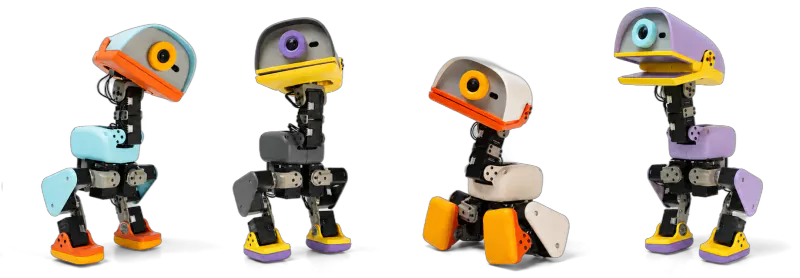
Microduck Simulator is the browser twin of Pollen Robotics' small open-source biped. The product is built around reinforcement-learning behaviors that can be trained in simulation and carried toward the physical robot. The interactive demo lets you try its movement vocabulary directly, including walking, sitting, kicking, picking up an object with the beak, and switching between Feet and Rollers. Its live HUD also exposes speed, odometer, frame rate, and a 50 Hz control indicator while you experiment.
How to Play Microduck Simulator: Waddle, Kick, and Experiment
Controls
Choose a colorway and decide whether to start on Feet or Rollers. Click Waddle in, then use the movement keys to cross the scene. Try a short run, lower the beak near an object, and press G to pick it up; follow with A or E to test a kick. Press R to sit and tap it again to stand, then switch the chase view with C or inspect the motion by dragging and scrolling. If the experiment gets untidy, press Space for a fresh start.
Game Features
- Guide a tiny biped through a live browser physics scene
- Try movement, left and right kicks, sitting, and beak pickup
- Switch between Feet and Rollers locomotion modes
- Pick Cream, Graphite, Lavender, or Sky colorways
- Orbit, zoom, or toggle the chase camera while testing motion
- Reset quickly and compare different robot behaviors
Microduck Gameplay & Sim-to-Real Videos
See the simulated twin, experimental behaviors, and the physical robot in these selected movement-focused clips.
Microduck Simulator FAQ
How do you start Microduck Simulator?
Open the browser demo, choose a colorway and either Feet or Rollers, then select Waddle in to enter the live simulation and begin testing movement.
What are the movement controls?
Use the arrow keys or ZQSD to move. On a QWERTY keyboard, the independent browser test also found AWSD practical when the on-screen ZQSD wording feels awkward.
How do you kick or pick up objects?
Use A or E for a left or right kick. To pick something up, move the beak close to the ground and press G so the pickup behavior can engage.
Can you change the duck's color and locomotion?
Yes. The running simulator offers Cream, Graphite, Lavender, and Sky colorways, plus Feet and Rollers modes for comparing different movement setups.