
Can I Run Leonida – PC Hardware Comparison Tool
Use Can I Run Leonida to compare your CPU, GPU, and RAM with community hardware bands for Xbox Series X, PS5, and a 1080p Low estimate. See which parts are in range, outside the range, or unknown.


















What This PC Hardware Checker Does
- Category
- Tools
- Platform
- Web browser
- Mode
- PC hardware comparison tool
- Developer
- assttro
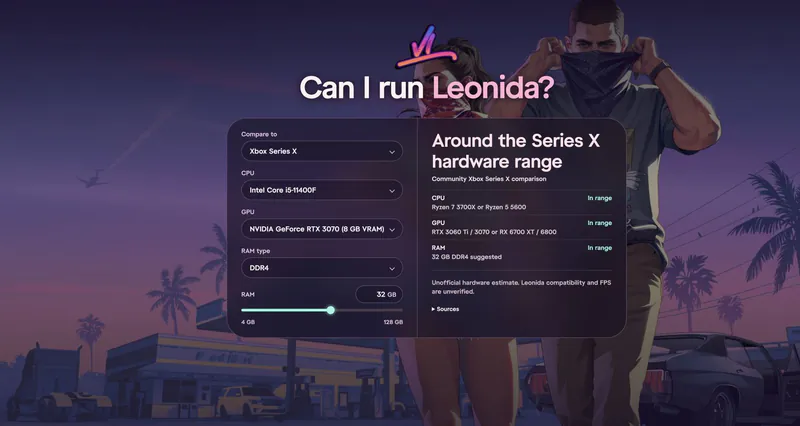
Can I Run Leonida is an unofficial hardware estimator built around a simple question: how does my PC compare with known console hardware and community guesses for Leonida? It does not inspect your computer, benchmark a game, or claim to know official requirements. You enter the parts yourself.
The checker supports Xbox Series X, PS5, PS5 Pro, Xbox Series S, and a community estimate for 1080p Low. CPU, GPU, RAM type, and RAM amount are compared separately, which makes it easier to see which component falls outside the selected range. Searchable lists cover desktop and laptop parts, integrated graphics, Intel, AMD, and NVIDIA models, with manual entry for missing hardware.
Benchmark bands are hand-maintained community estimates. Models without a matching band are shown as Unknown instead of receiving an invented score. Laptop and integrated results are compared with nearby desktop hardware where possible, but power limits and cooling remain major variables.
The estimator is separate from LEONIDA, the playable open-source fan game. assttro published the checker in November 2026. Its purpose is to provide a quick hardware comparison and source links, not to replace official requirements or a real benchmark.
How to Use the Can I Run Leonida Checker
Controls
Click Play Now above to open the checker in the game player. Start with Compare to and choose the hardware range you want to use: Xbox Series X, PS5, PS5 Pro, Xbox Series S, or the community estimate for 1080p Low. The target changes the bands shown in the result panel, so the same PC can look comfortable against one console and less certain against another.
Select your CPU and GPU from the searchable lists. If your exact model is missing, use the manual model entry rather than choosing a nearby part that does not match. Set the RAM type and amount last. The checker accepts DDR4 or DDR5 and includes desktop, laptop, and integrated-graphics parts.
Read each result as a band, not a performance promise. A component can appear In range, outside the range, or Unknown when there is not enough benchmark data for a reliable comparison. Results explicitly state that Leonida compatibility and FPS are unverified, so a positive result does not prove the separate browser game will run or reach a particular frame rate.
If you want to see where the comparison bands come from, open the Sources disclosure in the result panel. The estimator uses hand-maintained community bands, including a proposed 1080p Low range. Laptop results are especially approximate because identical GPU names can behave differently under different power limits and cooling systems.
Game Features
- Compare CPU, GPU, and RAM against several console or community targets
- Searchable desktop, laptop, and integrated hardware lists
- Manual model entry for parts missing from the catalog
- In range, outside range, and Unknown result states
- Visible source disclosure and a separate 1080p Low community band
Can I Run Leonida Hardware Check Videos
See how the checker presents its community hardware estimate.
Can I Run Leonida? Common Questions
What does Can I Run Leonida actually check?
It compares the CPU, GPU, RAM type, and RAM amount you enter against a selected hardware band. The result shows whether each part is in range, outside it, or unknown. It does not detect your PC automatically, install a benchmark, or measure FPS inside LEONIDA.
Which hardware targets can I compare against?
The compare menu includes Xbox Series X, PS5, PS5 Pro, Xbox Series S, and a community estimate for 1080p Low. Each target can produce a different result because its CPU, GPU, and memory bands are defined separately from the others.
What does Unknown mean for my CPU or GPU?
Unknown means there is not enough benchmark data to place your model in a reliable comparison band. The checker does not invent a score in that case. You can still compare manually, but treat the result as less certain than an In range or outside-range component.
Can I use laptop or integrated graphics?
Yes. Laptop CPUs, laptop GPUs, and integrated graphics appear in the selectors. Mobile parts are compared with nearby desktop models where possible, but power limits, cooling, and laptop design can make two systems with similar part names perform very differently.
Are these confirmed GTA VI PC requirements?
No. The checker is unofficial and uses community hardware predictions, including a proposed 1080p Low band. It explicitly states that Leonida compatibility and frame rates remain unverified. Use the result as a starting comparison, not as a promise that the game will launch or reach a target FPS.
Who made the checker, and where can I use it?
The project is published by assttro and went live in November 2026. It is a separate utility from the Leonida browser fan game. You can use the estimator at https://assttro.github.io/can-i-run-leonida/.