

Hunger Games Simulator Game – Create Your Own Tribute Story
Play the Hunger Games Simulator game in your browser: set the tribute count, name your cast, allow two champions, and advance through the Bloodbath, events, and death reports.



















A Custom Hunger Games Story Generator
- Category
- Simulator & Sandbox
- Platform
- Web browser
- Mode
- Custom tribute survival simulation
- Developer
- adrian-thumbtack GitHub project

Hunger Games Simulator 2.0 turns the familiar fictional death match into a lightweight browser story machine. You control the cast rather than a character: choose the participant count, enter tribute names and genders, permit or reject two champions, and then advance the simulation one event at a time.
The game opens with The Reaping and The Tributes, then moves into the Bloodbath. Each round produces short narrative incidents and a separate fallen list. Health points and kill counts make the event feed easier to follow, while cannon-shot messages mark the cost of a round before the next set of encounters.
This browser version is the adrian-thumbtack project, released as Hunger Games Simulator 2.0. That version added health points and made the code and website easier to navigate; Eric Zheng is credited for the rewrite work. The project history begins in September 2017.
This is not the BrantSteele simulator. BrantSteele hosts its own original and updated versions, so the tribute flow and page design can differ. The adrian-thumbtack build is the one behind the play link here and the four-person Bloodbath test shown in the screenshots.
From Setup to the Bloodbath
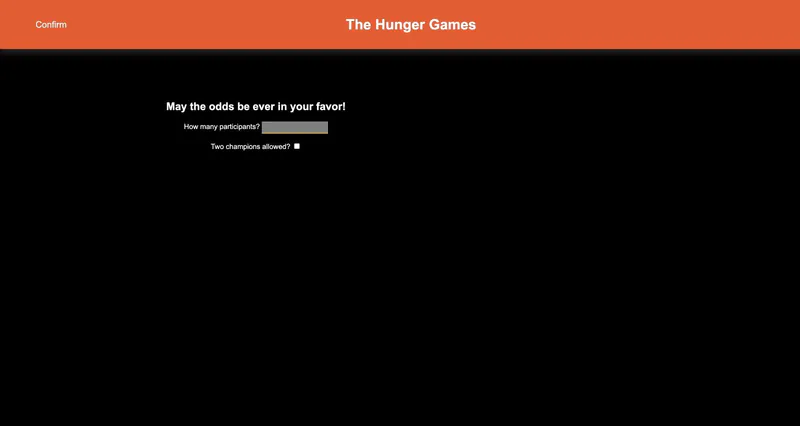
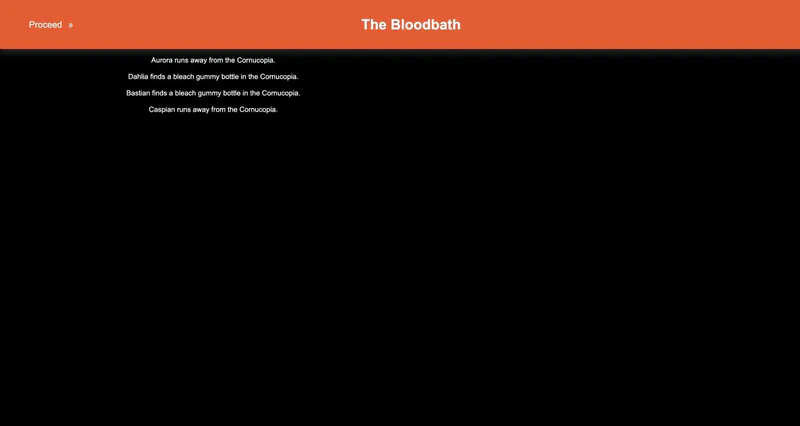
Screens from a four-tribute test run, showing the setup and first event round.
The Reaping
The Reaping screen, where you enter tribute names and choose M or F.
The Bloodbath
The Bloodbath screen, where the first round of events and deaths is shown.
How to Play the Hunger Games Simulator Game
Controls
Click Play Now above to open the simulator in the game player. Start by choosing the number of participants, then decide whether two champions are allowed. On The Reaping screen, give every tribute a name and choose M or F. The order you enter is the order you will follow through the event feed.
Confirm the names to see The Tributes. This screen is useful before you press Proceed: it shows each participant's health and current kill count. Once the simulation starts, every Proceed click reveals another narrative beat. The opening Bloodbath can send tributes running, finding items, fighting, or dying, and later rounds mix smaller encounters with larger set pieces.
Read the event sentences instead of watching only the survivor count. A character can find a weapon or supply, escape danger, form a temporary alliance, take damage, kill another tribute, or become the next name in the fallen list. The cannon-shot report tells you how many died in the round and highlights the consequences before the next day begins.
If you are new to the simulator, try a small cast first to learn the flow. A larger cast gives more chaotic combinations and longer rounds, while the two-champion option keeps a possible shared ending in play. No account is required, so a run begins immediately and continues until one tribute or the permitted champions remain.
Game Features
- Build a custom cast with any chosen participant count
- Name every tribute and select M or F
- Optionally allow a shared two-champion victory
- Health, kill counts, event narration, and fallen-tribute reports
- One-click Proceed pacing for the Bloodbath and later rounds
- Free browser play with no account or download
Hunger Games Simulator Gameplay Videos
Watch a custom cast move from setup into the event rounds.
Hunger Games Simulator Questions
How do I set up a Hunger Games Simulator match?
Choose the participant total and whether two champions are allowed, then enter a name and M or F for every tribute. Confirm the cast to open The Tributes screen, review the starting health and kill counts, and press Proceed to enter the Bloodbath.
What do health and kill counts mean?
Each tribute starts Alive with a health status and zero kills. The status and kill total change as rounds resolve, while a separate fallen report lists who died. Health points were added in the Hunger Games Simulator 2.0 version.
How does a simulation round work?
Press Proceed and read the event sentences for each surviving tribute. Events can involve finding supplies, running, fighting, taking damage, or dying. A following report shows the cannon shots and the names of tributes who fell, then the simulation moves toward the next set of encounters.
Can the match end with two champions?
Yes, if Two champions allowed is enabled before the match starts. The option changes the possible end condition; leave it off when you want a single survivor and a more traditional final result. The tribute count controls how long the story usually takes.
Is this the same as BrantSteele's simulator?
No. BrantSteele hosts a separate Hunger Games Simulator with its own original and updated versions. This browser build is the adrian-thumbtack project, with its own Reaping, Tribute, Bloodbath, health, and Proceed screens, so the two simulations should not be treated as one game.
Who made this version, and where can I play it?
This version is published under the adrian-thumbtack GitHub account, with Eric Zheng credited for the 2.0 code and website redesign. Its commit history begins in September 2017. You can play the browser build at https://adrian-thumbtack.github.io/HungerGames/index without installing anything.