

Sword Fight on the Heights Browser Game – Play Online
Sword Fight on the Heights Browser Game brings SFOTH IV to your browser. Join as a guest, collect swords, jump between sky platforms and learn swing and lunge controls.















The Classic Heights Arena in a Browser
- Category
- Arcade Games
- Platform
- Web browser
- Mode
- Online sword arena
- Developer
- John Shedletsky
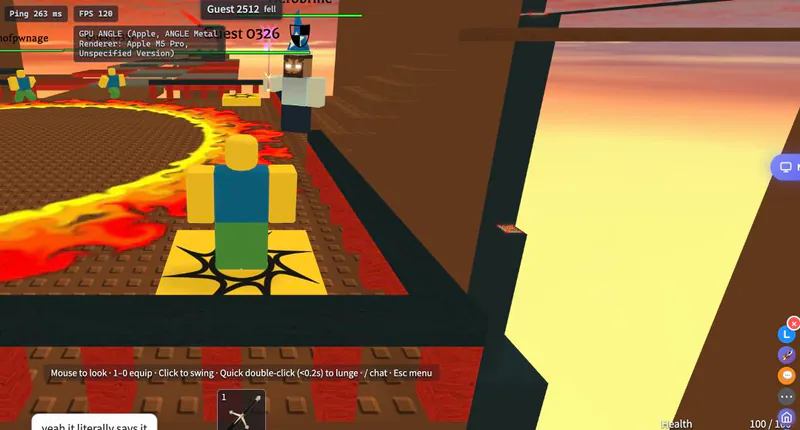
Sword Fights on the Heights IV is John Shedletsky's classic sword arena, now available through his browser port. The setting centers on elevated platforms and named sword pickups, with duels shaped by the danger of falling as much as by an opponent's attack. The map has more than a flat fighting floor. Wobbling bridges, conveyors, jump pads, teleporters and disappearing sections create routes with different risks. Moving toward a pickup means choosing where to land and how to get back, while fighting near a hazard can quickly change the outcome of an exchange. Guest access makes the browser version straightforward to try, and the lobby includes a live spectator view for watching the arena. Signed-in play adds a personal name and saved results. The browser connection still needs to reach a live arena, so wait for the connected game interface when entering a match. The creator's original trailer below shows the classic Roblox version of SFOTH IV. It is useful for seeing the arena's roots and sword-fighting style, while the Play Now game above is the browser port. The two share the Heights setting, but the old recording is not footage of the current browser interface.
How to Play Sword Fight On The Heights Browser Game
Controls
Click Play Now above to open SFOTH, then choose Play now as a guest inside the lobby. No account is needed to enter a guest match. The lobby also offers a live view of the arena and match choices, so you can look at the layout before joining. Wait for the connected arena and your health and inventory interface to appear before trying to fight. Begin by learning the space around your spawn. Move across a safe platform, turn the camera and practice a short jump. The arena is suspended in the sky, so a missed edge is a threat even when no opponent is close. Bridges, conveyors, jump pads and disappearing floors change how you approach the next section. Equip a sword from your inventory before attacking. A mouse click swings it, while a quick double-click triggers a lunge. The lunge is a different input from repeatedly clicking at a slow pace, so practice the timing in an open area. Keep enough room to recover from movement instead of attacking from the very edge of a platform. Explore the arena for additional sword pickups. Inventory number keys switch between collected slots, and Backspace drops the equipped blade. Named weapons include Windforce, Firebrand, Venomshank, Ice Dagger, Darkheart, Illumina and Ghostwalker. Try the blade you have acquired and watch how its attacks affect a fight rather than assuming all pickups feel alike. Use positioning as part of combat. A route that reaches an opponent quickly may also expose you to a conveyor, a collapsing surface or a jump with little landing room. Watch nearby platforms and hazards as well as the other player's sword. Teleporters and jump pads can change your route through the map, so learn their destinations before depending on them during a duel. On a phone, use the movement joystick, drag to look and use the Jump and Attack buttons. A wider view helps with navigation and camera control. Guest play provides a quick start; signing in is the separate option for playing under your own name and saving results.
Game Features
- Guest entry into John Shedletsky's browser SFOTH IV arena
- Elevated platforms, bridges and environmental hazards
- Named sword pickups and numbered inventory slots
- Separate swing and quick double-click lunge inputs
- Live spectator lobby and signed-in saved results
- Mobile joystick, camera drag, Jump and Attack controls
Classic SFOTH IV Trailer
John Shedletsky’s original Roblox-era recording; the browser port is playable above.
Playing, Controls and Game Rules
Where can I play Sword Fight on the Heights Browser Game?
Click Play Now above and choose Play now as a guest in the SFOTH lobby. Wait for the connected arena interface; guest play does not require creating an account.
Do I need to install Roblox to use this version?
The embedded game is John Shedletsky's browser port, so you can enter its guest arena through the browser. The classic Roblox game is the original version behind the port.
How do I swing, lunge and change swords?
Click to swing the equipped sword, or use a quick double-click for a lunge. Number keys select inventory slots, and Backspace drops the currently equipped blade.
Can I play with a phone's touch controls?
The game provides a movement joystick, Jump and Attack buttons and camera dragging on mobile. Give the arena enough screen space to see platform edges while moving and turning.
Is the video below footage of the browser port?
The embedded trailer is John Shedletsky's original Roblox-era SFOTH IV video. It shows the classic arena's roots; use Play Now above to enter the browser version and its current interface.