

Stackdle – Play the Daily Stacking Game Online
Stackdle is a daily physics stacking game: place up to 20 pieces, survive three falls and score by tower height. Play online or practice with unlimited retries.
















A Daily Physics Puzzle Scored by Tower Height
- Category
- Puzzle Games
- Platform
- Web browser
- Mode
- Daily stacking puzzle and practice
- Developer
- Isaac Audet / Amountle
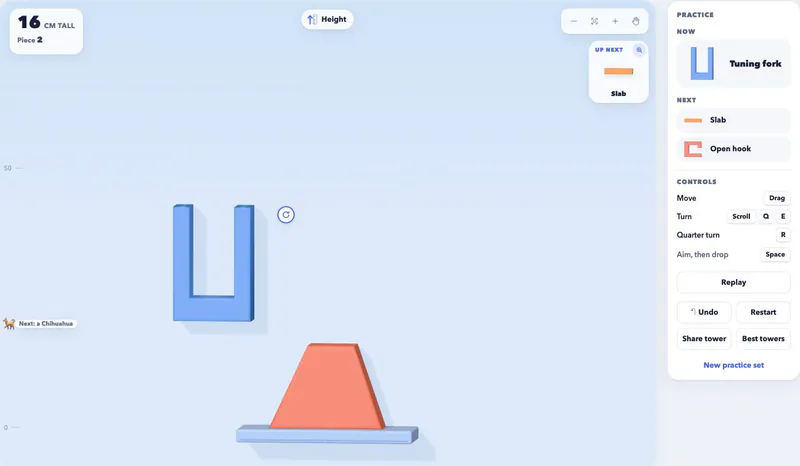
Stackdle is a daily stacking game by Amountle, whose creator Isaac Audet also makes other daily browser puzzles. Its challenge is physical: each shape needs a stable place on the current structure, and its orientation changes how it will rest after release. Height is the score. The daily limit of twenty pieces creates a balance between reaching upward and preserving enough support for later moves. Three falls give you a small amount of recovery, while the settling step separates an ambitious-looking placement from a tower that actually stands. Practice uses the same aiming and dropping ideas with endless pieces and retries. Undo and restarting the same pieces make it possible to compare placements without immediately changing the sequence. Starting a new practice set shifts the challenge to a different combination of shapes. The board supports both pointer and touch interaction. Upcoming-piece previews help with planning, and camera controls remain useful after the tower grows. A strong approach is to inspect the contact surfaces, release one piece, wait for the result and adjust the next move to the structure that remains.
How to Play Stackdle
Controls
Click Play Now above to open the board, then choose Daily or Practice. Daily gives you a limited run with up to twenty pieces and three falls. Practice is useful when you first want to understand how a piece moves, rotates and lands, because it provides endless pieces and retries. Position the active piece over a part of the tower that can support it. Drag it or use the horizontal arrow keys, then rotate it with the handle, mouse wheel or keyboard controls. On a touch screen, sliding nudges the piece and a two-finger twist turns it. The board remains steady while you aim, so take time to examine the piece's contact points. Check the next-piece preview before making a difficult placement. Its actual-size view helps you judge how much room a shape needs. A flat base can be easier to support than an angled edge, while a small adjustment may change which parts touch the tower. The ninety-degree rotation control is a quick way to compare orientations before making finer turns. Drop the piece when you are satisfied with the position. Let the movement finish: the tower has to settle before its new height counts. The result is measured in centimeters, so the objective is to build higher while keeping the structure stable. A risky position that immediately topples does not provide a reliable way to increase the score. If a piece falls in Daily, the game retries from the last steady tower and spends one of your limited fall opportunities. Reassess the placement before dropping again. In Practice, use Undo to try a different decision, Restart to revisit the same sequence, or New practice set when you want different pieces. As your tower grows, use the camera tools to keep the active area visible. Zoom, Move Camera and Fit whole tower change your view rather than repositioning a block. Separating camera adjustment from piece placement helps you keep control when the structure becomes taller than the first screen.
Game Features
- Daily stack with up to 20 pieces and three falls
- Score measured as settled tower height in centimeters
- Piece positioning and free rotation before release
- Unlimited Practice with Undo and same-set restarts
- Actual-size previews of upcoming shapes
- Touch gestures and camera tools for taller towers
Playing, Controls and Game Rules
Where can I play Stackdle online?
Click Play Now above to open the game board. Use Daily for the limited daily challenge or Practice when you want endless pieces and retries while learning the controls.
How does the daily score work?
Your score is the tower's height in centimeters after the structure settles. The daily run offers up to twenty pieces and three falls, so both stable placement and height matter.
Does one falling block end the daily game?
Daily begins with three falls. A fall uses one of those opportunities and retries from the last steady tower, giving you a chance to change the placement before the allowance runs out.
How do I rotate a piece on desktop or mobile?
Use the rotate handle, mouse wheel, or Q and E on desktop; R and the ninety-degree button give a quarter turn. On touch screens, twist two fingers to rotate the active shape.
Can I undo or repeat the same pieces?
Practice includes Undo, with Ctrl or Cmd plus Z as its shortcut, and Restart for the same pieces. New practice set changes the sequence when you want a fresh stacking problem.