
Destroy Any Website Game – Play Online
Destroy any website game turns webpage layouts into a destructible action level. Pick a demo or URL, use weapons and a jetpack, and try room-based play.





















About Destroy Any Website
- Category
- Arcade Games
- Platform
- Web browser
- Mode
- Website destruction sandbox
- Developer
- Hugo Duprez

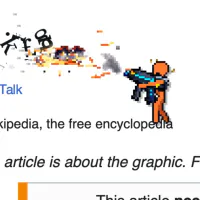
Created by Hugo Duprez and published by Sprite Fusion, Destroy Any Website combines familiar desktop action controls with a level built from a webpage. Instead of a fixed obstacle course, the selected site's text and rectangular layout provide the environment for your character and weapons. The result is a destruction sandbox in which positioning, aiming and traversal all matter. The game offers solo play and room-based sessions with up to five friends on the same website instance. Its pause screen includes Resume, Restart Site and New Website, along with background and sound options. Trying the supplied demo first makes it easier to learn how a website layout is converted into a scene before exploring another address. Sprite Fusion lists Chrome, Firefox, Safari and Edge on desktop. The available control guide uses keyboard and mouse inputs, including a right-click grenade action and mouse-wheel weapon selection; a separate touch-control mode is not documented.
How to Play the Destroy Any Website Game
Controls
Choose a starting website before entering the level. Demo Page is a convenient first attempt because it lets you inspect the action without deciding on a URL; Wikipedia is another built-in shortcut. Once the scene loads, look for your character, the available weapon slots and the destruction percentage. Webpage text and layout become the terrain you move through and shoot. Move into a useful position, aim at the structures around you and try a different weapon when you want a different attack. The jetpack lets you reach higher parts of the scene, while dropping through platforms helps you move down through a tall page. Watch the destruction counter as you experiment with the level. Use the pause menu when you want a fresh attempt on the same site or a different website. The room options also let you create or join a shared session using a room code. A keyboard and mouse are the intended setup; on a phone, open the guide if useful and switch to a desktop browser for the full control scheme.
Game Features
- Webpage text and layout used as destructible terrain
- Demo Page and Wikipedia shortcuts alongside website URL entry
- Weapon switching, grenades, jumping and jetpack traversal
- Solo play and room sessions with up to five friends
- Pause-menu options for restarting or selecting another website
Destroy Any Website Gameplay Videos & Walkthrough Guides
Destroy Any Website Game FAQ
How do I start without choosing a website?
Select Demo Page to load the supplied sample level, or use the Wikipedia shortcut. Both options let you begin without typing a website address.
Does destroying a page change the real website?
The destruction takes place in the game scene built from the selected webpage. You move and shoot within that rendered level, where the game tracks the destroyed percentage.
Can I play with friends?
Yes. Sprite Fusion describes room-based play with up to five friends on the same website instance. Use Create Room or join with a room code from the start interface.
Is there a touch-control mode for phones?
On narrow screens, the game asks you to make the window wider or open it on a bigger screen. Its controls require a desktop keyboard and mouse, so use a wider desktop view to play.
How do I reset or choose another website?
Open the pause menu with Esc. Restart Site starts another attempt on the current website, while New Website returns you to the website-selection flow.