

VC Web GTA – Play Vice City Online & Save Guide
VC Web GTA brings Vice City to the browser through Quenq. Open the external player and learn game saves, mobile controls and FPS troubleshooting.
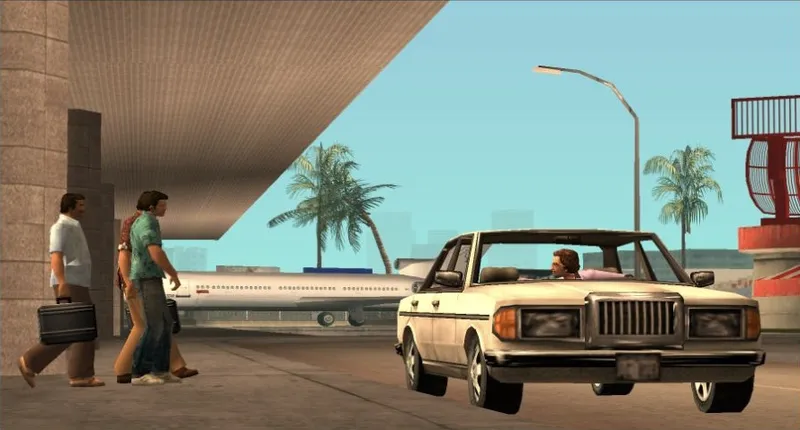
Open Quenq’s Vice City browser player, then choose Play Game in its launch menu.
Play on QuenqThe game opens on Quenq. Its host does not allow embedding on this site.



















About VC Web and the Vice City Browser Experience
- Category
- Driving Games
- Platform
- Web browser: desktop and mobile
- Mode
- Single-player open-world action adventure
VC Web GTA is the browser experience hosted by Quenq for Grand Theft Auto: Vice City. It brings the original single-player setting and story into a web player: a fictional coastal metropolis inspired by Miami in 1986, neon streets, vehicles and Tommy Vercetti’s rise through its criminal world. It is Vice City, not GTA V or GTA VI, even when social posts use a generic GTA headline. Quenq describes the port as built on revcDOS and the reverse-engineered reVC engine, using WebAssembly with dynamically streamed assets. That makes the browser player different from installing a conventional PC package, but it still needs to load data and render a full 3D game. Performance depends on the browser and device; instant access does not mean every phone will run it smoothly. The surrounding launch menu supplies a Save Manager and an FPS limit alongside Play Game. These controls matter for longer sessions: a backup gives you a portable copy of progress, and a frame cap can keep the original physics more predictable. Standard desktop inputs, gamepads and mobile touch controls are documented by the host. This is a third-party browser port hosted by Quenq, not a new Rockstar release. For current host instructions or troubleshooting, consult Quenq’s Vice City information. Its PC cheat guide also lists familiar codes, though a fresh story session is the simplest way to learn the controls and objectives before changing the game world.
How to Play VC Web GTA: Start, Explore and Keep Your Progress
Controls
Click Play on Quenq above to open the external VC Web player, then choose Play Game in its launch menu. The game runs on Quenq because the host does not allow embedding on this site. When the start prompt appears, click inside the game area. Select Start Game and New Game for a fresh story, or Load Game if you already have a compatible save. Give the engine time to load its assets, and keep an internet connection available because the host streams game content while you play. Before setting off, open Options and check Controller Setup. Desktop players use a keyboard and mouse; the host also supports standard gamepads. Follow the displayed bindings for walking, entering vehicles and driving instead of assuming that one keyboard layout works on every device. On a phone, use the built-in touch controls, turn to landscape and expand the game to fullscreen when available. Your first useful sequence is to move around the starting area, enter a vehicle and practice steering before following a mission objective. The story follows Tommy Vercetti after an ambushed deal leaves him trying to recover money and build influence in Vice City. Explore between objectives, then return to the story when you are comfortable with movement and driving. Keep progress separate from simply keeping a browser tab open. VC Web includes a Save Manager that can upload compatible .b saves and download backups. Use the game’s save system, then export a backup if you want to retain a copy or move progress to another device. Uploading an existing save is optional for a new game. If a mission behaves strangely, check the launch menu’s FPS limit. Its default 0 means unlocked, while the original engine was designed for 30 FPS. Choosing 30 can resolve physics-related mission problems; a 30 or 60 cap can also reduce load on a hot phone or low-powered laptop. If you see a black screen or persistent lag, the host recommends checking whether browser hardware acceleration is enabled.
Game Features
- Vice City’s single-player story and open-world exploration in a browser
- Launch menu with Play Game, Save Manager and Mod Manager
- Keyboard and mouse, standard gamepads and mobile touch controls
- Upload compatible .b saves and download progress backups
- Adjustable FPS limit for physics consistency and reduced device load
- No separate game installation; assets load through the host
VC Web GTA Gameplay Videos & Walkthrough Guides
VC Web GTA Questions & Answers
Where can I play VC Web GTA online?
Click Play on Quenq above to open the external browser player. The host does not allow embedding on this site. Choose Play Game, click the start prompt, then use Start Game → New Game to begin or Load Game to continue a compatible save.
Can I play on a phone or with a controller?
Quenq documents mobile touch controls and standard Xbox or PlayStation gamepads. Landscape orientation and fullscreen give touch controls more room. Desktop players can use the keyboard and mouse.
How do I keep my progress or move it to another device?
Use the in-game save system, then download a backup through Save Manager. It accepts compatible .b saves and exports files such as sf*.b, so keep a copy before moving devices or clearing browser data.
Why does a mission have broken physics?
The launch menu defaults to an unlocked frame rate, shown as 0. The original engine was designed for 30 FPS; select 30 if odd physics stop you completing a mission.
What should I check if the game is black or very slow?
The host recommends browser hardware acceleration for black-screen or heavy-lag problems. Also try a 30 or 60 FPS cap to reduce load on a phone or low-powered laptop.
Is this GTA V, GTA VI or an official new release?
It is a third-party web port of GTA Vice City hosted by Quenq. The setting is the 1986-inspired Vice City story with Tommy Vercetti, rather than GTA V or GTA VI.