
SURFD CS Surf Browser – Play Online & Ramp Guide
SURFD CS Surf Browser lets you practice ramp movement online. Pick linear or staged courses, learn A/D strafing and compare your runs on desktop.














About Surfd
- Category
- Sports Games
- Platform
- Web browser
- Mode
- CS surf ramp runs
- Developer
- 0yield
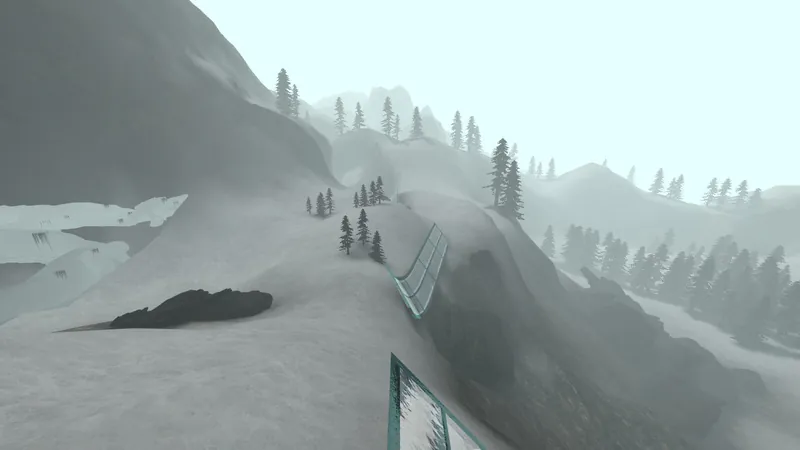
Surfd takes Counter-Strike-style surfing into a browser: you follow sloped ramps, manage direction in the air and try to reach the finish with a better time. Its live collection currently shows 20 courses, with a mixture of linear routes and staged courses rather than one repeating obstacle layout. The course card tells you what to expect before joining. Boreas has snowy ravines and glass ramps; Utopia and Mesa are also listed as Tier 1 linear courses. Beginner divides its route into seven stages, while Reprise is a Tier 2 linear option. Tier and course type are useful starting points when choosing what to practice next. Small steering changes matter more than frantic forward input once you are on a ramp. The built-in help specifically tells you to release W on the ramp and strafe toward its face. Learn a repeatable transfer, finish a run, then try to improve the same segment. Records, local bests and guest runs give the timer a purpose beyond reaching the end. An account is needed to save ranked times, but you can enter a course as a guest. The separate untimed Practice facility suits players who want to work on movement without chasing a leaderboard immediately. The project is credited to 0yield. It is an independent surf implementation with its own development notes; players should not assume every movement detail behaves identically to every Counter-Strike version.
How to Play SURFD CS Surf Browser
Controls
Click Play Now above, choose Solo and select a course. Boreas is a useful place to start: its card labels it Tier 1 and linear, with two checkpoints. Wait until the picker says Ready to surf, choose your display mode and join the map. Click Return to game when the menu is open so the game can capture your mouse. Begin at the green start zone and leave it to start the timer. Approach a ramp, release forward movement once you are surfing and hold the strafe direction toward its face. Make gentle mouse turns to follow the surface. Large corrections make it harder to keep a smooth line; repeat a short section until you can make its transfer consistently. Aim for the gold finish zone. Watch your current run time and compare a completed attempt with the local best shown on the course card. The menu also offers Restart run and Watch route, giving you ways to repeat the same course and inspect a route. You can start as a guest; sign in after finishing if you want to save a ranked time. Change map when you want a different kind of route. Linear courses label checkpoints, while staged courses label stages: Beginner shows seven stages and Kitsune shows nine. The picker can sort by difficulty or course type, so use those labels to choose another manageable session instead of jumping straight to a higher tier. For isolated movement practice, open the Practice facility. It offers eight untimed stations according to the game notes. Try that before comparing ranked times. Online is a separate tab in the course picker; start with Solo while learning the controls. Use a desktop with a keyboard and mouse. In windowed mode, choose C for crouching because Ctrl plus W can close your browser tab. If the game asks for mouse capture, click inside its player again; you can also open Surfd from the link below and try the current Chrome or Edge browser.
Game Features
- 20 courses in the current picker with tier and course-type labels
- Linear checkpoints and multi-stage routes
- Solo and Online selection tabs
- Green start and gold finish zones with a run timer
- Guest runs, local bests and sign-in for ranked times
- Eight untimed Practice facility stations
- Windowed-mode crouch guidance for desktop browsers
Surfd FAQs
Where can I play Surfd?
Click Play Now above to open the game, pick a course and join it. Use a desktop keyboard and mouse, then click Return to game to give the player mouse control.
Which course should I try first?
Choose a Tier 1 course and read its type before joining. Boreas is linear with two checkpoints; Beginner splits its route into seven stages, which gives you a different practice structure.
Why does the guide tell me to release W?
Once you are on a ramp, the built-in help calls for strafing toward the ramp face and steering gently with the mouse. Holding forward is not the recommended ramp technique.
Do I need an account to begin a run?
You can enter as a guest. The game asks you to finish and then sign in if you want to save a ranked time; the picker also displays a local best for each course.
How can I crouch without closing my tab?
Use C in windowed mode. The game warns that Ctrl plus W is a browser close-tab shortcut; fullscreen is another display choice offered before joining.
Is there practice without a timer?
Open the Practice facility from the game menu. Its eight untimed stations let you work on movement before attempting a timed course.