
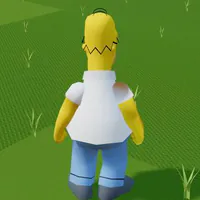
Simpsons Hit and Run Browser – Play Online & Controls
Play this unofficial Simpsons Hit and Run browser reconstruction. Start the campaign, drive, explore on foot, and learn the mission and save controls.















About The Simpsons: Hit & Run Browser Reconstruction
- Category
- Driving Games
- Platform
- Web browser
- Mode
- Open-world driving & missions
- Developer
- Vheissu
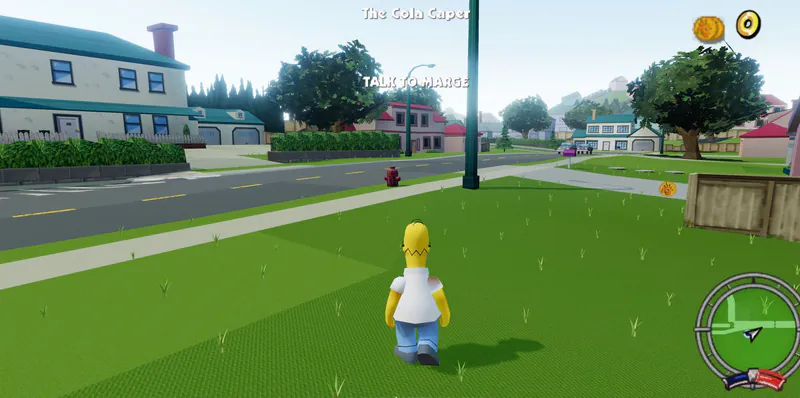
This Simpsons Hit and Run browser project rebuilds Springfield for the web using Three.js and converted PlayStation 2 game assets. It is an unofficial reconstruction with its own recreated movement and driving systems, not a PlayStation 2 emulator or an official remaster. The project includes seven level variants and five player characters, with 49 story missions alongside seven bonus missions, 21 street races and seven wager races. New Game follows the campaign’s opening objective, so your first session combines movement, interaction and mission guidance instead of dropping you into an unrelated fan map. You can switch between exploring on foot and driving, change the camera, follow the radar and recover a stuck vehicle. Police pursuit and a capture penalty add consequences to disruptive driving. Browser saves preserve progression such as unlocked vehicles and outfits as well as the latest story checkpoint. The reconstruction is still being developed. Some features remain unfinished, including collectible-card gameplay, some traffic behaviors and portions of the menus, and full-playthrough testing is ongoing. Expect a web adaptation with known gaps rather than exact parity with every original mission and physics detail. Vheissu’s source project explains the supported controls and current limitations. Its original code license does not replace the rights attached to the original game assets, and the project states that it has no affiliation with the original rights holders.
How to Play Simpsons Hit and Run Browser
Controls
Click Play Now above and let the player load. Choose Press Start, then New Game to begin the campaign. The opening mission is The Cola Caper, and your first objective is Talk to Marge. Follow the objective and radar instead of treating the opening neighborhood as a race with an unmarked finish. Walk toward an objective and use the interaction control when you reach a character, building or vehicle. Your movement and action keys change meaning depending on whether you are on foot or driving: the same Space input jumps on foot but works as a handbrake in a car. Practice entering and leaving a vehicle before taking a longer mission route. On foot, you can run, kick and double jump. For the double jump, press the jump input again near the apex of the first jump. When driving, watch the road and radar, use the handbrake deliberately, and reset to the road if you get stuck; the reset also repairs the car. Camera and look-behind controls help you check your surroundings. Follow each mission’s displayed objective. Failed missions can be retried, and the pause menu gives you access to Mission Select, Level Progress, Options and Save Game. The project recreates story missions, bonus missions and races, although full campaign testing is still ongoing. Keep an eye on police heat while causing damage around Springfield. The reconstructed pursuit rules include a 50-coin capture penalty, so careless driving can cost more than time. Once you are comfortable with the story route, explore bonus activities and race types from the campaign rather than assuming everything starts as a free-drive challenge. Your coins, cars, outfits, completed missions and latest story checkpoint are stored in this browser. Return using the same browser profile to continue that progress. Touch driving and gamepad driving are supported, but use the keyboard or pointer for menu navigation if a controller menu action does not respond.
Game Features
- Campaign start with The Cola Caper and Talk to Marge
- Seven level variants and five player characters
- Driving and on-foot movement with contextual actions
- Story missions, bonus activities, street races and wager races
- Police heat with a 50-coin capture penalty
- Local browser saves for progression and the latest story checkpoint
- Road reset and vehicle repair shortcut
- Touch driving and standard gamepad driving support
The Simpsons: Hit & Run Browser Reconstruction FAQs
Where can I play the browser reconstruction?
Click Play Now above, let it load and choose Press Start followed by New Game. The first campaign objective is Talk to Marge in The Cola Caper.
Is this an official Simpsons remaster or a PS2 emulator?
It is an unofficial Three.js reconstruction using converted PS2 assets. The project recreates movement and driving itself and says it is not affiliated with the original rights holders.
Does it recreate the full original game exactly?
It is not a 1:1 recreation. The project includes story and race mission sets, but full-playthrough testing is ongoing and some traffic, collectible-card gameplay and menu details remain unfinished.
How is campaign progress saved?
Progress is stored locally in your browser, including coins, unlocked cars, outfits, missions and the latest story checkpoint. Keep using the same browser profile to continue those saves.
What should I do if my car gets stuck?
Use the road-reset control to return the vehicle to the road and repair it. If the mission has failed, use the retry control instead to attempt its objective again.
Can I use touch controls or a gamepad?
The project supports touch driving and standard gamepad steering and triggers. Full gamepad menu navigation is still unfinished, so keep keyboard or pointer input available for menus.