
Black Ops Browser Game – Play Online & BO1 Zombies Maps
Play the Black Ops browser game at vel.gg/bo1z. Choose from ten BO1 Zombies maps, check Hell mode rules and follow desktop loading and control tips.
Open BO1 Zombies, choose a map and wait for the desktop player to finish loading.
Play Now on vel.ggRequires a desktop keyboard and mouse.















About the BO1 Zombies Browser Port
- Category
- Arcade Games
- Platform
- Web browser
- Mode
- Zombies survival (first-person)
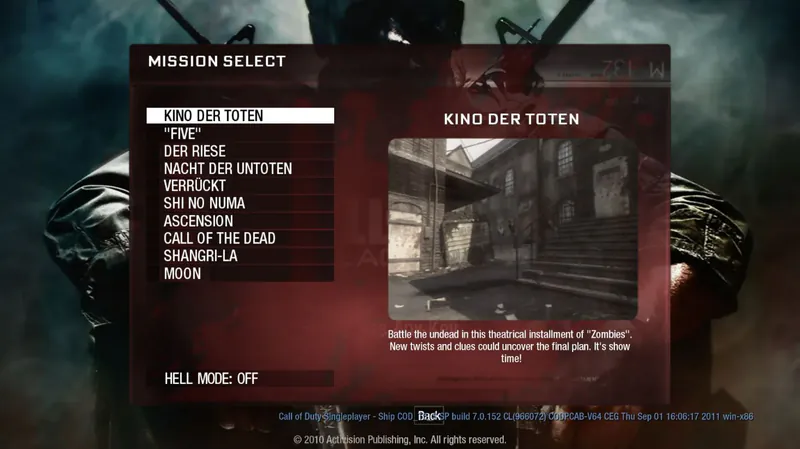
Black Ops Browser Game opens the community BO1 Zombies player at vel.gg/bo1z. This Black Ops 1 browser project focuses on Zombies survival. The COD Zombies browser player opens a map selector. The current entry is a Zombies map selector; it does not show the original campaign or a multiplayer server browser. The ten selectable maps are Kino der Toten, “Five”, Der Riese, Nacht der Untoten, Verrückt, Shi No Numa, Ascension, Call of the Dead, Shangri-La and Moon. The selection menu uses each map’s title and preview, letting you choose a familiar location before loading its game data. Availability in the selector should not be read as a guarantee that every original Easter egg or long playthrough behaves perfectly. Kino der Toten’s launch sequence downloads game data, loads the map and prepares graphics before showing Click to Start. Once those stages finish, the player needs a mouse-capture click for first-person controls. The wrapper includes sensitivity, master volume and fullscreen options; fullscreen changes require a reload according to its label. Hell mode is a separate option with unusually demanding rules: round 100 from the start, up to 300 simultaneous zombies and no perk machines. Keep it off while learning the browser setup and basic movement. Those rules are supplied by the live selector, rather than assumed from a standard original-game difficulty. This is a community browser project, not an official Activision web release. The original Windows controls are a reference for getting started rather than a promise about every browser binding. Plan on desktop keyboard and mouse play. The visible entry does not establish online co-op, controller support, mobile controls or campaign access. The matching browser gameplay video below provides a look at BO1Z’s loading and presentation, while the creator announcement and source project provide context for its development.
How to Play Black Ops Browser Game
Controls
Click Play Now above to open vel.gg/bo1z in a new tab after the launch countdown. Use a current desktop browser with a keyboard and mouse. The game’s own notice names Chrome, Edge and Firefox. Select a map from the mission-style list; Kino der Toten is one of the choices and has a dedicated loading screen. Leave Hell mode off for your first session. Its description says it starts at round 100 with up to 300 zombies at once and removes perk machines. That is a very different opening challenge from learning the controls during a normal run, so check the toggle before choosing your map. Wait through the whole loading sequence. Downloading, Loading and Preparing Graphics are separate stages, each with its own progress display. A completed download does not mean the scene is ready; wait until Click to Start appears, then click that prompt so the game can request mouse and sound access. The control cards use the original Black Ops PC defaults. Begin by checking movement, aiming, firing and reload in the loaded scene, then follow the interaction prompts it displays. If the browser build or your settings use a different binding, follow the in-game prompt. The current wrapper exposes mouse sensitivity and volume through Options. The original Zombies loop is survival through increasingly dangerous waves. Pay attention to remaining ammunition and use the interaction prompt when approaching an object. Keep enough space to move while reloading and learn the route around your opening area before committing to a more crowded section. The map list offers other locations when you want a different setting; it does not provide a campaign menu. If the prompt says mouse or sound access was declined, keep the game tab active and click Click to Start again. The game cannot use mouse-look until mouse capture succeeds. Check the wrapper’s Options before starting; its fullscreen setting says a reload is needed to change it. Performance depends on your browser, hardware and the selected map. Wait for graphics preparation to finish and close unnecessary heavy tabs if the browser is under load. A completed loading bar is different from a stable frame rate. Start with one normal-mode map and judge your own system before trying Hell mode.
Game Features
- Ten named Zombies maps in the selector
- Direct desktop browser launch at vel.gg/bo1z
- Separate download, map-load and graphics-preparation progress
- Hell mode starting at round 100 with up to 300 zombies
- Hell mode removes perk machines
- Mouse sensitivity, master volume and fullscreen wrapper options
- Original BO1 PC control reference with explicit scope
- Matching browser gameplay video showing loading and presentation
BO1 Zombies Browser Port Videos & Guides
BO1 Zombies Browser Port FAQs
Where can I play the Black Ops browser game?
Click Play Now above and wait for the launch countdown to open vel.gg/bo1z. Use a current desktop browser, select a map and let all loading and graphics-preparation stages finish before clicking the game’s start prompt.
Which Zombies maps are listed?
The current selector lists Kino der Toten, Five, Der Riese, Nacht der Untoten, Verrückt, Shi No Numa, Ascension, Call of the Dead, Shangri-La and Moon. A listed map does not guarantee every original Easter egg works.
What changes when Hell mode is enabled?
The live description says you begin at round 100, can face up to 300 zombies at once and have no perk machines. Leave the toggle off when learning a normal opening and the browser controls.
Why is the game still preparing after downloading reaches the end?
Downloading, loading the map and preparing graphics are different steps. Keep the tab open until Click to Start appears; the first completed bar does not mean the playable scene is ready.
Does this include the campaign, mobile play or online co-op?
The current entry presents Zombies maps rather than a campaign or server browser. Use a desktop keyboard and mouse, and do not rely on mobile, controller or co-op support that the visible game entry does not establish.