

Projeto Grau 2 Download & Guide: Motorcycle Stunts on Google Play
Learn how Projeto Grau 2 works, from wheelies and open-city riding to jobs and garage upgrades, then use the official Google Play link to download it on Android.
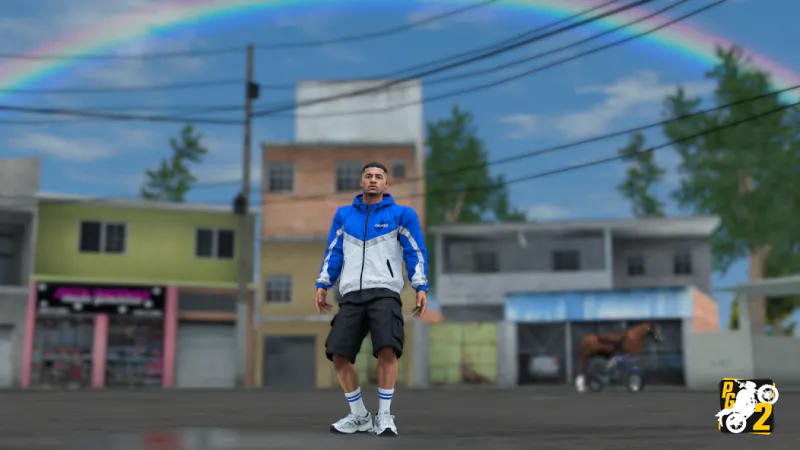
Open the official Insanity Group listing to check device compatibility and install the current Android release.
Download Projeto Grau 2 on Google PlayThis guide links to the official store. It does not provide a browser build, mod APK or infinite-money download.
















About the Open-City Motorcycle Simulator
- Category
- Sports Games
- Platform
- Android; Windows through Google Play Games on Intel-powered PCs
- Mode
- Open-city motorcycle and vehicle simulation
- Developer
- Insanity Group
- Status
- Released with ongoing updates
Projeto Grau 2 is a motorcycle and vehicle simulation game by Insanity Group, set in an open city. Its main appeal is controlled riding: raise the front wheel, manage throttle and brake, correct the motorcycle’s balance, and turn ordinary streets into practice space for wheelies, stoppies, burnouts and other manoeuvres. The Google Play listing describes physics designed around wheelies, so the game feels more like a riding sandbox than a conventional race.
The city also works as an everyday-life simulation. You can walk, ride a motorcycle or drive a car while traffic, traffic lights, weather, day and night changes and a minimap/GPS shape movement. A quiet street suits balance practice, while a busier road makes braking, spacing and recovery more important. A short session can therefore be stunt practice or a wider city ride.
Progression comes through jobs and the garage. Deliveries, freight, packages and service work pay in-game money, which you can use toward motorcycles and cars. The workshop then adds customization through wheels, tyres, suspension, camber, paint, motorcycle-part appearance and car audio, so you can change how a vehicle looks and is set up while building your collection gradually.
The Google Play listing is the verified place to check the current Android download and compatibility details. It also lists Windows availability on Intel-powered PCs through Google Play Games. Search results may mention APK files or “dinheiro infinito”, but this guide does not treat unverified mirrors, mods or cheats as official features. Use the store link above, keep the app updated, and treat community videos as demonstrations rather than installation sources.
See the City and Wheelie Physics
These gameplay screenshots show the open-city setting and a motorcycle ride on the street.
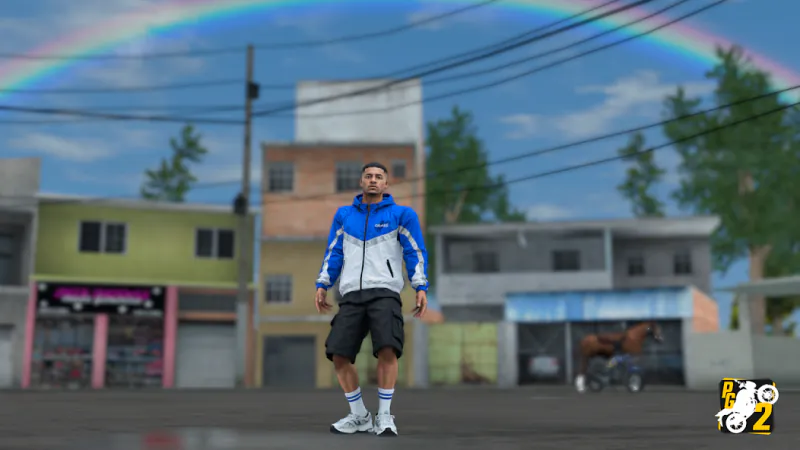
Open-city ride
A city view showing the motorcycle and the urban setting.
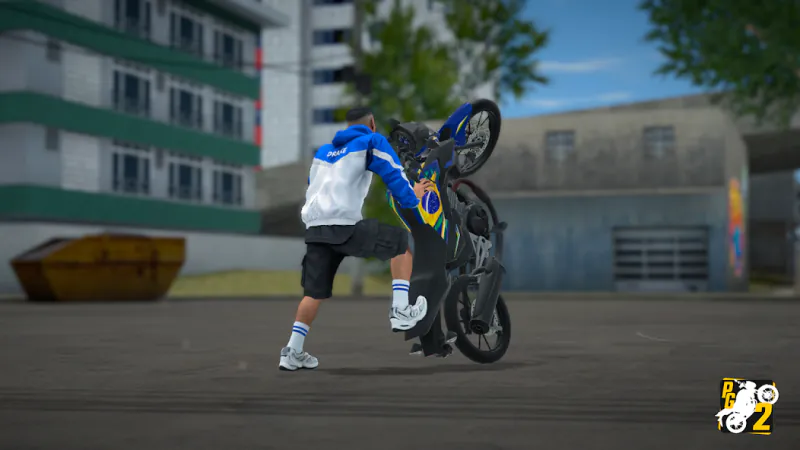
Wheelie on the street
A gameplay screenshot of a controlled wheelie during street riding.
How to Play Projeto Grau 2: Wheelies, Jobs and City Riding
Controls
Click Play Now above to open the official Google Play listing, then install the current release on a compatible Android device. Start in a quiet part of the city. The game is built around an open-city loop rather than a single closed track, so spend a few minutes learning how the throttle, brake and balance inputs respond before attempting a long wheelie.
Begin with a short ride. Use the throttle to build enough speed, then lift the front wheel and make small balance corrections instead of holding one input. Stoppies, burnouts and foot-to-ground moves can add variety later, but the first goal is control: keep space around the bike, slow down before traffic, and recover cleanly when the angle becomes uncomfortable.
The city adds structure to the ride. You can walk between locations, ride a motorcycle or switch to a car, and traffic, traffic lights, the minimap/GPS, day and night, and weather change how a route feels. Follow the map when you want to learn the layout, or explore without a destination when you want to practice on a specific street or find a safer stretch for balance work.
When you want progression, take jobs rather than looking for shortcuts. The listing describes deliveries, freight, packages, electrician, lumberjack and fruit-delivery work that pays in-game money. Start with a simple assignment, then use the earnings to build your garage gradually.
Visit the workshop when a vehicle needs a new look or setup. You can change wheels, tyres, suspension, camber and paint, and the listing also mentions motorcycle-part colors or images and car audio. Change one category at a time so you can tell whether a new setup suits the way you ride.
Keep the mobile control layout readable. Settings let you adjust the on-screen controls, and a comfortable arrangement matters more than copying someone else’s gesture pattern. The game is free with advertisements, and the store warning matters: use safety equipment, respect traffic laws and never copy a stunt in real traffic.
Game Features
- Open city with traffic, traffic lights, weather, day and night, and a minimap/GPS
- Wheelies, stoppies, burnouts, foot-to-ground moves and other motorcycle manoeuvres
- Walk, ride a motorcycle or drive a car through the city
- Delivery, freight, package and service jobs that pay in-game money
- Garage and workshop customization for wheels, tyres, suspension, camber and paint
- Motorcycle-part colors or images and car audio customization
- Adjustable on-screen controls for mobile play
- Official Android download on Google Play, with Windows availability through Google Play Games on Intel-powered PCs
Projeto Grau 2 Community Gameplay Videos
Projeto Grau 2 Download, Android and Gameplay FAQ
Where can you play Projeto Grau 2?
This guide does not offer browser play. Click Play Now above to open the official Google Play listing, where you can check Android compatibility and install the game. The listing also notes Windows availability through Google Play Games on Intel-powered PCs.
How do you find a Projeto Grau 2 download for Android?
Use the official Google Play link above, check that your Android device is compatible, and install the current release from Insanity Group. Avoid download buttons from random search results, since they may not lead to the official source.
Is there an official Projeto Grau 2 APK?
The official route this guide verifies is the Google Play listing. It does not recommend separate APK files from other websites, because their origin, version and safety cannot be checked.
Can you get Projeto Grau 2 dinheiro infinito?
This guide does not list an infinite-money mode or an official mod. The in-game money described by the listing comes from deliveries, freight, packages and service jobs, and you can use it for vehicles and customization.
What can you do in the open city?
Walk, ride motorcycles or drive cars while navigating traffic, traffic lights, weather, day and night changes, and a minimap/GPS. You can also take jobs, visit the garage and find a quieter street for stunt practice.
How do the wheelie and motorcycle controls work?
Use the throttle to build speed, the brake to slow down and balance inputs to keep the front wheel under control. Start with short wheelies in an open area, and try stoppies, burnouts or other manoeuvres only after your recovery timing feels comfortable.