

Pokemon All 22 Football – 22-Player Builder, Bowl & Pro
Build and share a 22-player Pokémon football lineup, then open ALL-22 BOWL or ALL-22 PRO from the official mode hub. Play Now opens all22pokemon.com in a new tab.
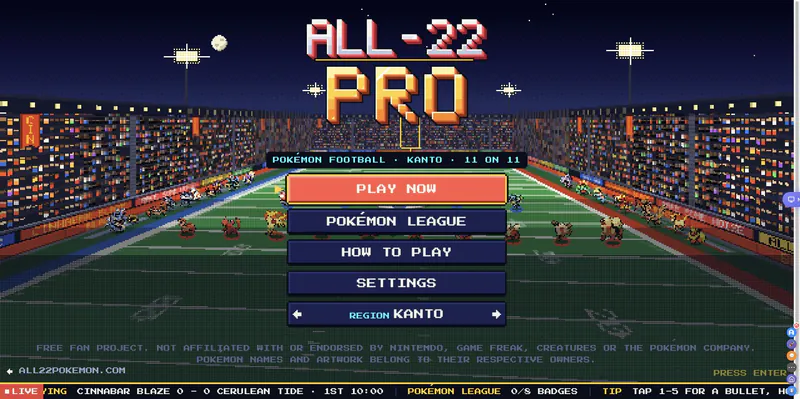
Open the official /play hub in a new tab to choose ALL-22 BOWL or ALL-22 PRO.
Play Now on All-22
















About Pokemon All 22: Builder, /play, and /pro
- Category
- Sports Games
- Platform
- Web browser
- Mode
- Pokémon football lineup builder and 11-on-11 modes
- Developer
- ColeThereum
Pokémon All-22 is a fan project that combines a team builder with football modes. The root page is the roster editor: set 11 offensive and 11 defensive Pokémon, review the displayed stats, and export or copy the result. The /play route is the launch hub, where you choose ALL-22 BOWL or ALL-22 PRO. The separate /pro route takes you straight to the behind-the-huddle Pro mode. The builder offers generation filters, a Legendary toggle, alternative defensive and offensive setups, a kicker option, and three sprite styles. Those choices help you create a lineup before opening the football modes. BOWL uses a side-view, Tecmo-style presentation, while PRO includes a different camera and its own league and draft paths. The project describes itself as a free fan project and states it is not affiliated with Nintendo, Game Freak, Creatures, or The Pokémon Company. The leaderboard uses X sign-in; lineup editing and the save-image and copy-link tools are separate from that leaderboard.
How to Play Pokemon All 22 Football
Controls
Start on the official Builder page at all22pokemon.com, where the field holds 22 positions across offense and defense. Click a player to replace it, hover to inspect the stats shown for that role, or drag one player onto another to swap them. The Lineup Builder link below Play Now opens this page directly. Use the lineup settings to shape your team: pick a generation range, toggle Legendary Pokémon, choose 3-4 or 4-3 defense, switch FB to Slot offense, decide whether to use a kicker, and pick Pixel, Retro, or Artwork sprites. Save image or Copy link before you leave the builder. When your team is ready, click Play Now above to open the official /play hub in a new tab. Choose ALL-22 BOWL or ALL-22 PRO there. BOWL is the side-view, Tecmo-style 11-on-11 option; PRO uses a behind-the-huddle view with its own league and draft modes. The Open ALL-22 PRO link below the button goes straight to /pro. Use the region selection and on-screen instructions to begin a match. If you pick Pro, check the listed receiver, passing, and ball-carrying hints before the snap. This is a free fan-made Pokémon football project, not an official Pokémon release.
Game Features
- Editable offense and defense make a 22-player lineup
- Swap Pokémon, inspect stats, and share a saved team
- Generation 1–9, Legendary, formation, and sprite options
- Pick ALL-22 BOWL or ALL-22 PRO from the mode hub
- BOWL and PRO use different football camera presentations
- The leaderboard uses X sign-in
Pokemon All-22 Gameplay Videos & Walkthrough Guides
Pokemon All 22 Lineup Builder FAQs
Where do I start Pokémon All 22?
Click Play Now above to open the official /play mode hub in a new tab, then choose ALL-22 BOWL or ALL-22 PRO. The Lineup Builder and direct Pro links are below the button.
Can I customize all 22 positions?
Yes. The builder has 22 positions across offense and defense. Click a player to replace it, or drag one player onto another to switch lineup spots.
Can I save or share a lineup?
Use Save image to export the lineup, or Copy link to share its setup. Randomize creates a different team, while Reset and Clear all help you start over.
Do I need an account to make a lineup?
X sign-in is listed for the leaderboard. The lineup builder itself offers save-image, copy-link, and team-editing controls without requiring that leaderboard.