CHIMERA Vocal Synth – Physical-Modeling Voice Synthesizer
CHIMERA vocal synth is a physical-modeling voice synthesizer. Drag the airway handles to shape the sound, play notes with your keyboard, and switch between Play, Speak, Sing, Bestiary, and Beatbox in your browser.






















A Voice Built from a Simulated Airway
- Category
- Simulation Games
- Platform
- Web browser
- Mode
- Physical-modeling voice synthesis
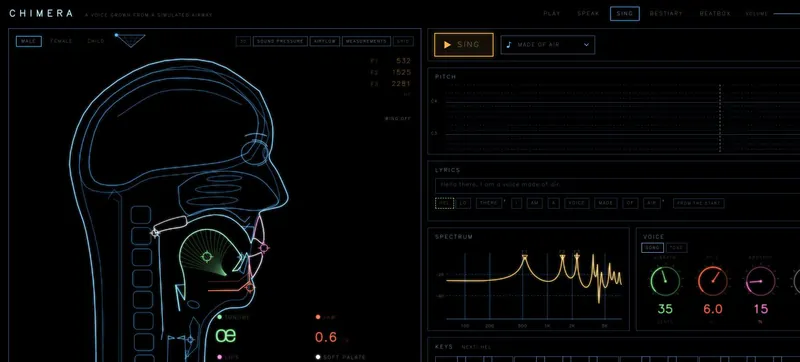
CHIMERA is a browser synthesizer that generates sound from a simulated vocal system rather than playing recorded samples. Its model includes lungs, vocal folds or a syrinx, a branched vocal tract, lips, and nose.
Use Play to shape sounds with the airway controls. Use Speak to turn English text or IPA into vocal gestures, and Sing to arrange lyrics and pitch. Bestiary lets you try animal models such as songbird, seal, alligator, and elephant, You can also open Beatbox. The voice model can blend continuously among male, female, and child settings.
How to Use the CHIMERA Vocal Synth
Controls
Start by choosing a mode: Play, Speak, Sing, Bestiary, or Beatbox. In Play, drag the visible airway handles to shape the sound, then use your computer keyboard to play notes. In Speak, type English text or IPA and let it drive vocal gestures and prosody. In Sing, arrange lyrics on the pitch roll. You can also try animal models in Bestiary or explore Beatbox mode. Adjust the body blend and watch the live pressure, airflow, spectrum, or formant displays as you go.
Game Features
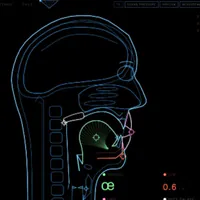
- Shape a simulated airway by dragging the visible tongue, jaw, lip, palate, and larynx handles
- Switch among Play, Speak, Sing, Bestiary, and Beatbox workspaces
- Type English text or IPA in Speak, or arrange lyrics on the pitch roll in Sing
- Blend the modeled body and watch live pressure, airflow, spectra, and formants
CHIMERA Physical-Modeling Voice Synthesizer FAQ
What makes CHIMERA a physical-modeling voice synthesizer?
It synthesizes sound from a simulated airway instead of playing samples. The model includes lungs, vocal folds or a syrinx, and a branched vocal tract. Drag the airway handles to hear how this physically modelled voice synthesizer responds.
What can I do in CHIMERA?
Use Play to shape sounds with the airway controls, Speak to turn English text or IPA into vocal gestures, Sing to arrange lyrics and pitch, Bestiary to explore animal models, or switch to Beatbox.
Can I change the modeled voice?
Yes. The body model blends continuously among male, female, and child settings. Move the body controls while using a mode to hear how the modeled voice changes.
How do I play notes with my computer keyboard?
Press A through semicolon to play notes, and use Z or X to change octave. The Play workspace also supports Web MIDI.
Which languages does Sing support?
Sing supports English and Korean lyrics. Arrange the words on its pitch roll and set pitches to shape the melody.