
Azeroth Survivors Game — Play Online
Play Azeroth Survivors Game online: choose a Warcraft-inspired class, dodge enemy waves in Elwynn Forest, and collect boss gear for later runs.



















About Azeroth Survivors
- Category
- Role-Playing Games
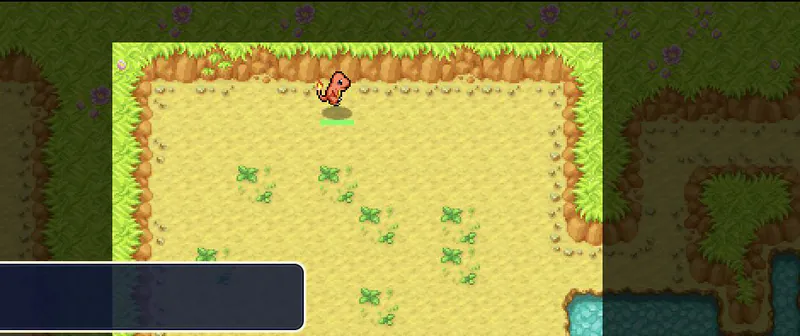
Azeroth Survivors turns familiar Warcraft classes and locations into a solo survival roguelike. Instead of managing an MMO party, you guide one character through waves of enemies while automatic abilities do the fighting. Your positioning and the upgrades you choose shape each attempt.
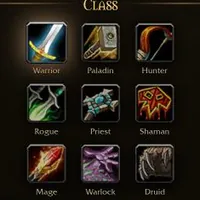
The class selector offers nine starting points: Warrior, Paladin, Hunter, Rogue, Priest, Shaman, Mage, Warlock and Druid. Each has its own description and starting ability. The first zone is Elwynn Forest, and later destinations show which boss from the previous zone you need to defeat before they unlock. That makes learning the current encounter more useful than trying to rush through the whole zone list.
Progress has two layers. The active run gives you moment-to-moment combat and card choices, while collected boss gear and talent progression give you reasons to return to the character screen. Check what you have earned before another attempt, especially if you are changing class.
This is an unofficial, fan-made singleplayer game by Aethus. It draws on the Warcraft setting but has its own survival format and is not the World of Warcraft MMO. A desktop keyboard and mouse are the clearest way to start.
How to Play Azeroth Survivors Game
Controls
Click Play Now above to open the game. The first start may take a little longer, and a loading screen appears before you can play. Pick one of the nine classes, read its description and starting ability, then press Enter to begin in Elwynn Forest. Your attacks fire automatically, so your job is to steer with WASD or the mouse buttons, keep space between you and approaching enemies, and leave yourself a route to escape.
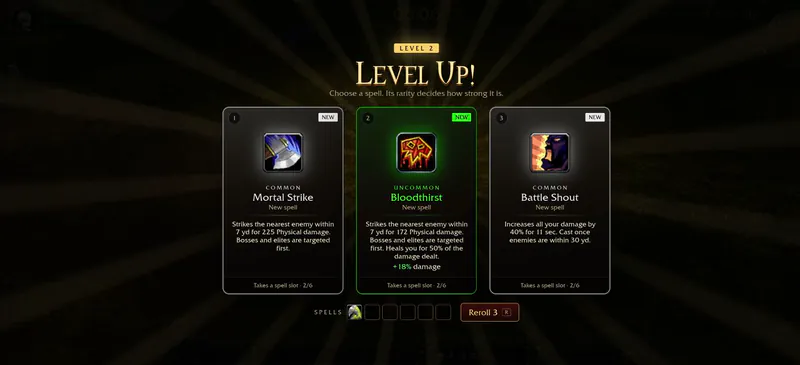
When you level up, a set of cards appears. Compare each option with the abilities you already have, then press 1, 2 or 3 to choose. If none of the cards suit your approach, press R to reroll them. If you are unsure where to start, choose a class whose starting ability is easy to understand and use your first runs to learn how close enemies can get before you need to change direction.
Later zones are locked behind bosses, so simply entering a run does not unlock every location. Between attempts, go back to the character menu and check Collection, Armory and Talents. Boss gear you collect is kept permanently for that class, so switching class means working with a different collection.
Game Features
- Nine classes, from Warrior and Mage to Druid, each with its own description and starting ability.
- Automatic attacks, with movement, spacing and level-up card choices left in your hands.
- Elwynn Forest first, followed by zones unlocked by defeating bosses.
- Permanent boss gear, plus Collection, Armory and talent progression that carry across runs.
Azeroth Survivors Gameplay Video
Azeroth Survivors FAQ
Where can I play Azeroth Survivors Game?
Click Play Now above to play it right here in your browser. Choose a class and start in Elwynn Forest. The first start may take a little longer, and a loading screen appears before the zone.
Is this multiplayer like World of Warcraft?
No. It is a singleplayer fan game built around surviving enemy waves. You control one character and its run progression rather than joining the World of Warcraft MMO.
Why are the other zones locked?
Each later zone lists a boss from the preceding zone that you must defeat first. Start with Elwynn Forest and use those listed requirements to decide your next goal.
Does anything carry over between runs?
Yes. Boss gear is collected permanently for your class, and talent XP contributes to longer-term progression. Check Collection, Armory and Talents between attempts to see what you can use.
What controls should I use to start?
Use a keyboard and mouse. Move with WASD or both mouse buttons, press 1, 2 or 3 to pick a level-up card, R to reroll the cards, and Enter to start a run from the menu.